
CRM vs. Spreadsheets: 5 Warning Signs Your Business is Ready to Scale
In the startup phase, spreadsheets are the ultimate “free” tool. Whether you use Microsoft Excel or Google Sheets, they offer a familiar interface for tracking contacts. However, as business complexity grows in 2026, relying on manual data entry becomes a bottleneck that stifles revenue growth and team productivity.
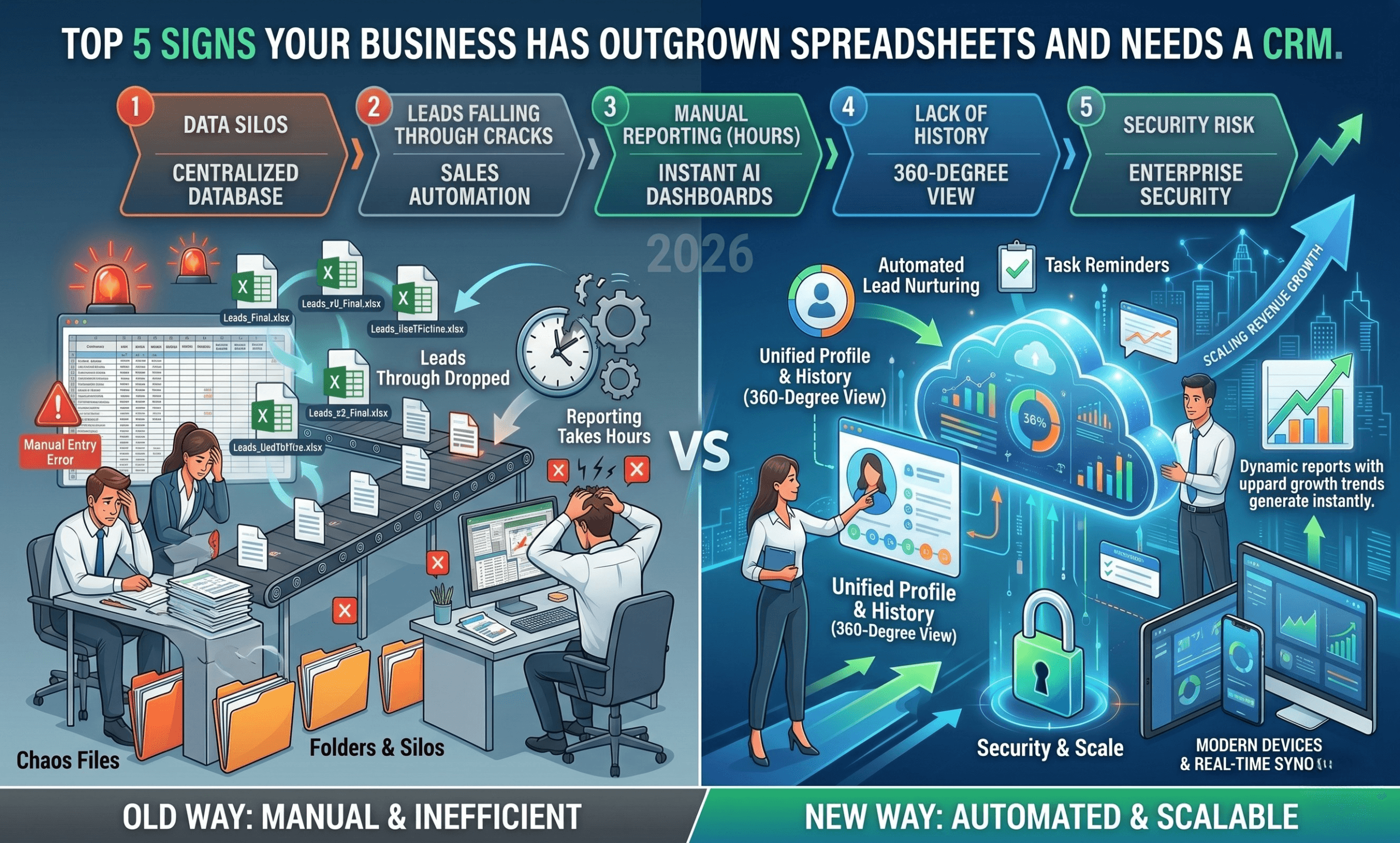
If your team is spending more time managing rows than closing deals, you’ve reached the “Spreadsheet Ceiling.” Here are the five definitive signs that it is time to move to a Customer Relationship Management (CRM) system.
1. You Have “Data Silos” and No Single Source of Truth
As teams expand, decentralized data becomes a liability. If your sales team uses one spreadsheet, marketing uses another, and support has their own version, you are creating data silos.
- The Risk: Conflicting information leads to embarrassing customer interactions.
- The CRM Advantage: A cloud-based CRM provides a centralized database. In 2026, top-tier CRMs use real-time syncing to ensure every department sees the same live data, eliminating “version control” errors.
2. Lead Leakage is Impacting Your Bottom Line
Are prospects “ghosting” you because you forgot to follow up? Spreadsheets are static and passive. They don’t alert you when a lead hasn’t been contacted in three days.
- The Statistic: Businesses that use a CRM can see lead conversion rates increase by up to 300%.
- The CRM Advantage: By utilizing automated workflows, a CRM sends reminders to your sales reps. If a lead doesn’t respond, the system can automatically trigger a “nurture” email, ensuring no deal falls through the cracks.
3. Reporting and Forecasting Take Hours (Not Seconds)
Manual reporting is the enemy of agility. If your Friday afternoon consists of “cleaning” Excel data to create a pivot table for your sales forecast, your process is broken.
- The SEO Insight: Predictive Analytics and AI-driven reporting are the standard for 2026.
- The CRM Advantage: Modern CRMs offer instant, visual dashboards. With one click, you can see your Sales Pipeline Velocity, Customer Acquisition Cost (CAC), and Expected Revenue for the quarter.
4. Poor Customer Experience Due to Lack of Context
Customers in 2026 expect personalized service. If a client calls and your team has to ask, “When did we last speak?” or “What did you buy last month?”, you are failing the “Experience Economy.”
- The Problem: Spreadsheets don’t store interaction history, email threads, or support tickets.
- The CRM Advantage: You get a 360-degree customer view. Every call, email, and LinkedIn message is logged chronologically, allowing your team to provide context-aware service that builds brand loyalty.
5. Security Vulnerabilities and Lack of Scalability
Spreadsheets are notoriously easy to steal. A single “File > Download” and your entire customer list—your company’s most valuable asset—is gone. Furthermore, once a sheet hits 10,000+ rows, it becomes sluggish and prone to crashing.
- The Risk: Lack of Role-Based Access Control (RBAC).
- The CRM Advantage: Enterprise-grade security ensures that you control who can see, edit, or export data. Furthermore, CRMs are built to scale, handling millions of records without a dip in performance.
Direct Comparison: CRM vs. Spreadsheets
| Feature | Spreadsheets (Manual) | CRM Software (Automated) |
| Searchability | Basic (Ctrl+F) | Advanced (Global Search & Filters) |
| Automation | None | High (Email, Tasks, Alerts) |
| Data Integrity | Prone to human error | Validated & Cleaned |
| Mobile Access | Poor User Experience | Native Apps for Remote Teams |
| Scalability | Hard Limit (Rows/Performance) | Unlimited Growth Potential |
How to Successfully Migrate from Excel to a CRM
Transitioning doesn’t have to be painful. Follow these three steps to ensure a high ROI on your new software:
- Clean Your Data: Remove duplicates and outdated contacts before importing.
- Start with the Basics: Focus on lead tracking and contact management before diving into complex automations.
- Choose the Right Tool: In 2026, look for CRMs that offer AI integration (like HubSpot, Salesforce, or Zoho) to automate note-taking and lead scoring.
Frequently Asked Questions (FAQ)
What are the top 3 benefits of a CRM over Excel?
The top three benefits are automation of routine tasks, centralized customer data, and real-time reporting that allows for better business decisions.
Is a CRM too expensive for a small business?
No. Many CRMs offer “Freemium” models. The cost of a CRM is usually offset by the increased productivity and the revenue gained from saved leads.
Can I integrate my existing tools with a CRM?
Yes. Modern CRMs integrate with Gmail, Outlook, Slack, and even social media platforms like Meta Ads, creating a seamless workflow.
Conclusion: Future-Proof Your Business
In the fast-paced market of 2026, a spreadsheet is a rearview mirror—it only shows you what has already happened. A CRM is a GPS—it shows you where you are going and how to get there faster.
Don’t let your data hold you back. If you recognized these five signs in your daily operations, it’s time to retire the spreadsheet and invest in a system built for growth.